If you sell data and airtime, your receipt is more than just proof that a transaction was completed. It can also be part of your business branding.
Think about it: every time a customer buys data or airtime from you, you send them a receipt. Instead of sending a generic receipt, you can make that receipt carry your business name or logo.
This makes your business look more professional and helps customers easily identify where the transaction came from.
With Inlomax, you can customize your transaction receipts directly from the app without having to design a receipt yourself.
Table of Contents
Why Should VTU Vendors Brand Their Receipts?
As a VTU vendor, you probably send several transaction receipts to customers every day. Adding your business identity to those receipts can have some simple but useful benefits.
1. It Makes Your Business Look More Professional
A branded receipt gives your customers the impression that you take your business seriously.
Instead of receiving a plain transaction confirmation, customers see your business name or logo on the receipt.
2. Customers Can Easily Identify Your Transactions
If a customer has several transaction receipts on their phone, a branded receipt makes it easier to identify the one that came from your business.
Your business name or logo serves as a simple identifier.
3. It Helps Build Your Brand
Branding doesn’t only happen on your social media pages or business banner.
Every interaction with your customer can contribute to your brand.
If you regularly send receipts carrying your business name or logo, customers become more familiar with your business identity.
4. It Is Useful for VTU Resellers
If you operate a data or airtime vending business and sell to multiple customers, customized receipts can make your transactions look more organized.
You can use your business name or logo instead of sending generic-looking receipts.
How to Brand Your Data and Airtime Receipts on Inlomax
Setting up a custom receipt on Inlomax is straightforward.
You don’t need to design a receipt from scratch. You simply choose what you want displayed on your receipt and save your settings.
Step 1: Log in to Your Inlomax Account
Open the Inlomax app and log in to your account.
If you already use Inlomax to buy data, airtime, or pay bills, you can access the receipt customization feature from your account.
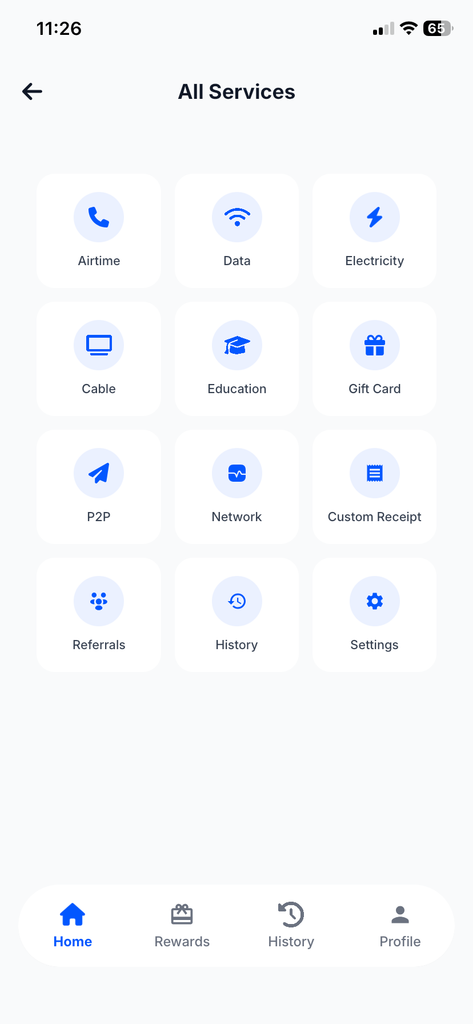
Step 2: Click on “More”
After logging in, go to the More section of the app.
This is where you can access additional Inlomax features and settings.

Step 3: Select “Custom Receipt”
From the More section, click on Custom Receipt.
This takes you to the receipt customization settings.
Step 4: Turn On Custom Receipt Mode
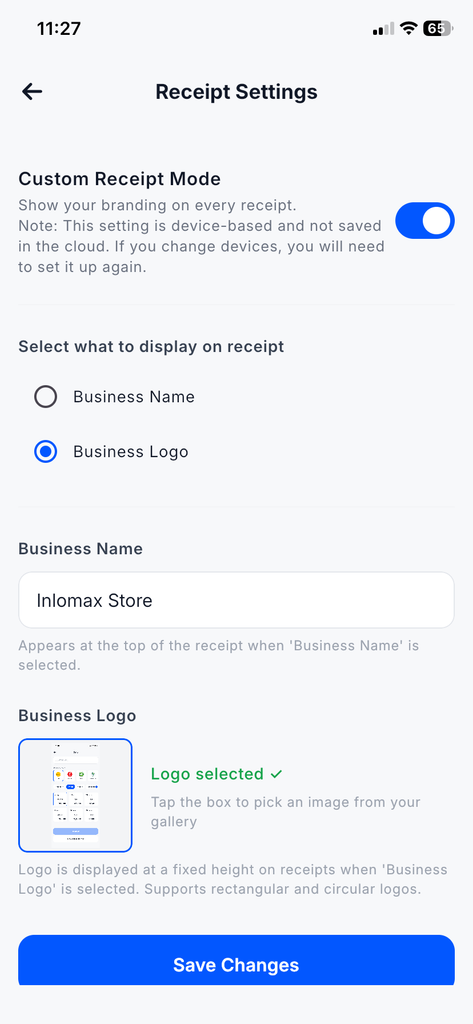
You will see an option for Custom Receipt Mode.
Turn it on to activate customized receipts for your transactions.
Step 5: Choose What You Want to Display
Inlomax allows you to choose what you want to use for your receipt branding.
You can select either:
- Business Name
- Business Logo
If you select Business Name, enter the name of your business.
If you select Business Logo, provide the logo you want to use for your business receipts.
Step 6: Save Your Settings
After entering your business name or adding your logo, click Save.
That’s it.
Your custom receipt settings are now ready.
From then on, your applicable transaction receipts can carry the business identity you selected.
Turn Your Receipts Into a Branding Opportunity
Many VTU vendors focus heavily on their prices, network availability and customer service, but overlook small details that can make their business look more professional.
Your receipt is one of those details.
When you send a receipt with your business name or logo, you’re not just confirming that a customer bought data or airtime. You’re also reminding them of your business.
And you don’t need expensive software or graphic design skills to do it.
With Inlomax, you can set up your custom receipt directly from the app in just a few steps.