Looking for the easiest way to send data to a friend or surprise someone with extra data? This blog will show you, step-by-step, how to share data on Airtel—with all the new codes and options that actually work!
What Exactly Is Airtel Data Sharing?
Airtel data sharing lets you send data from your existing bundle to another Airtel line or buy a fresh bundle for someone else.
How to Share Data on Airtel
USSD Code With *321#
One of the easiest ways to share data on Airtel is to use the USSD code
- Open Your Phone’s Dialer and Dial *321#
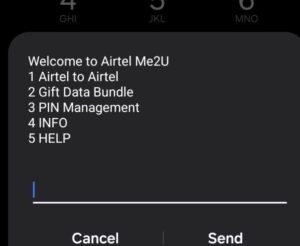
- Select Option 2: Gift Data Bundle
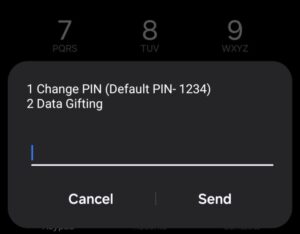
- Choose Data Gifting
- Pick what type of bundle you want to buy (daily, weekly, monthly, etc.)
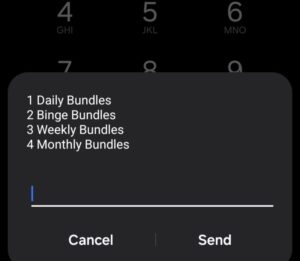
- Select if you want to pay from your airtime or from Airtel SmartCash (if you have an account)
- Enter the Airtel number of the person you want to gift the bundle to
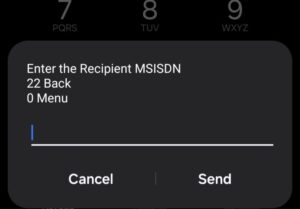
- Confirm and submit details the recipient gets the new bundle, with its own validity!
Using the Airtel Thanks App
If you prefer mobile apps:
Download or open the Airtel Thanks (MyAirtel) App on your smartphone
Log in with your Airtel number
Navigate to “Data Gifting” or “Share Data”
Choose bundle, enter recipient, pick payment, confirm
Conclusion
You can gift new bundles from your airtime, transfer from your own active bundle, or do both using the app. Always make sure you’re sending to an Airtel number and keep your PIN secure
E
Written by Ezra De Blogger
Inlomax Technologies Limited is a licensed telecom aggregator and digital payments infrastructure provider in Nigeria. Our insights are fact-checked against official telecom tariffs (MTN, Airtel, Glo, 9mobile) and Nigerian fintech standards.
Verified Contributor • Inlomax Editorial Team
Power Your VTU & Bill Payments with Inlomax
Get unbeatable reseller rates on MTN, Airtel, GLO & 9mobile data, electricity, and exam pins instantly.
Create Free Account